
ONE Dashboard
by greatinflux.com
Your site, shop or CMS already sends data to Google Analytics 4 and Search Console. Connect those two once, and every number lands in a single dashboard.
GA4 + Search Console → one viewYour website’s traffic and search results, in one report.
GreatInflux connects to your Google Analytics 4 and Google Search Console and turns them into a single, plain-English dashboard — so you can see what brings visitors, what turns them into enquiries, and where you rank on Google, without opening either tool.
Two Google tools in. One clear report out.
GreatInflux reads Google Analytics 4 and Google Search Console with your permission, joins them up, and shows the answers on one page.
Your GreatInflux reportUpdated automaticallyEvery number that matters, from the two tools you already use
No spreadsheets and no exports. Connect once, and the report keeps itself up to date.
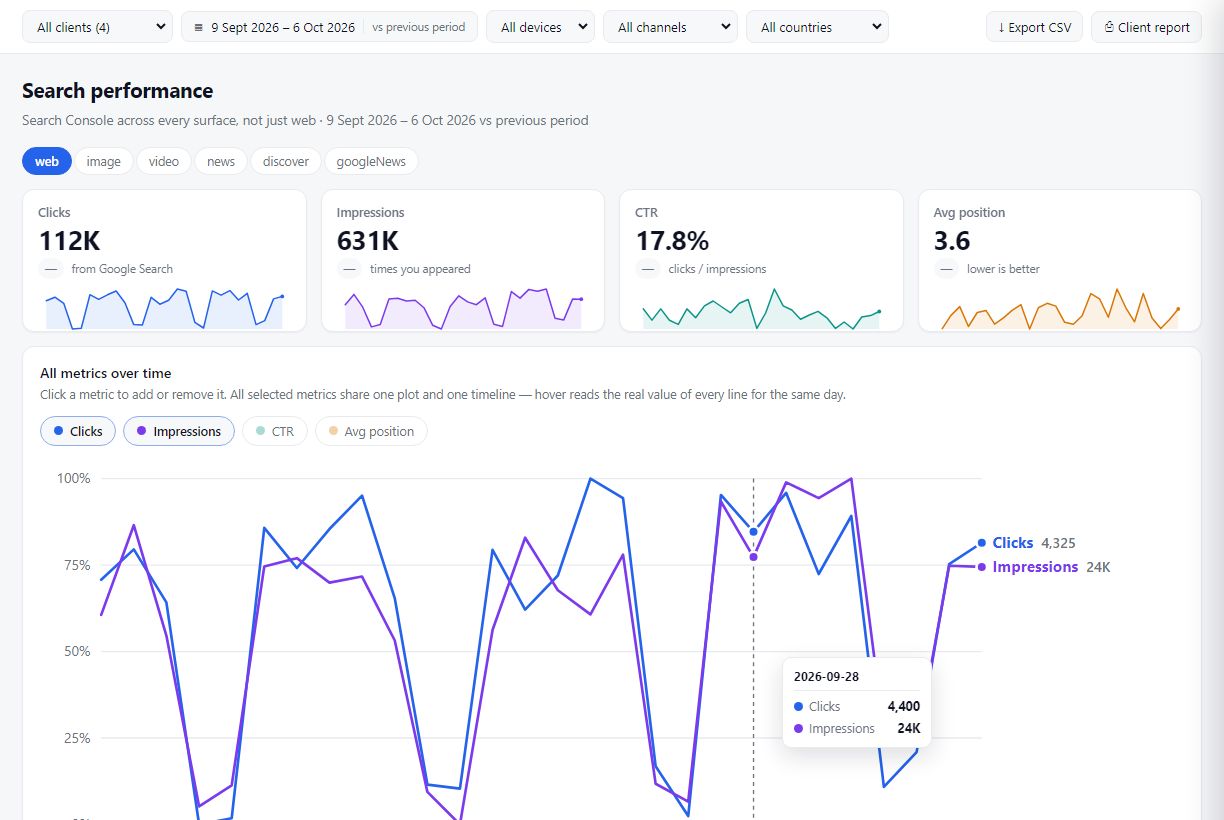
See how people find you on Google
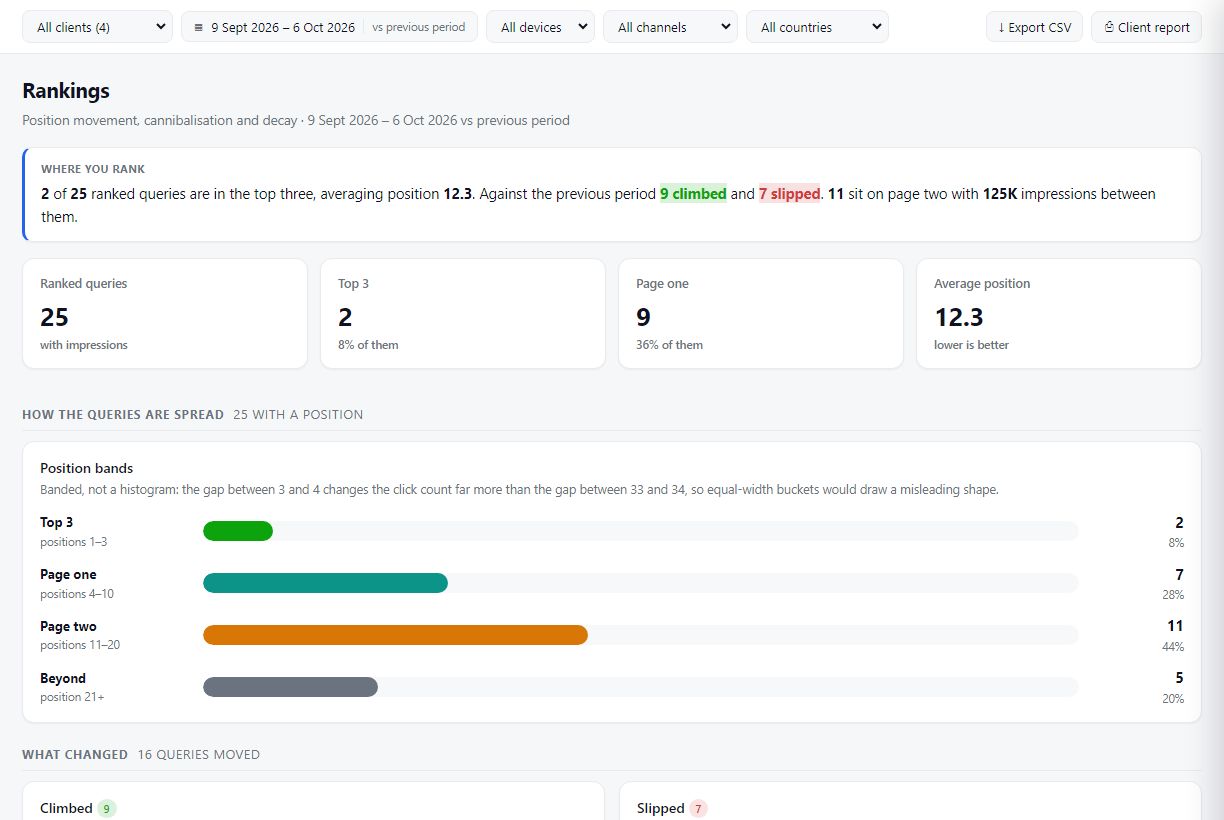
Clicks, impressions, click-through rate and average position — for every search query, page, country and device, compared with the previous period.
- Top queries and pages, with what moved up and what slipped
- Web, image, video, news and Discover results side by side
- Pages that need attention, ranked by what they are worth to you
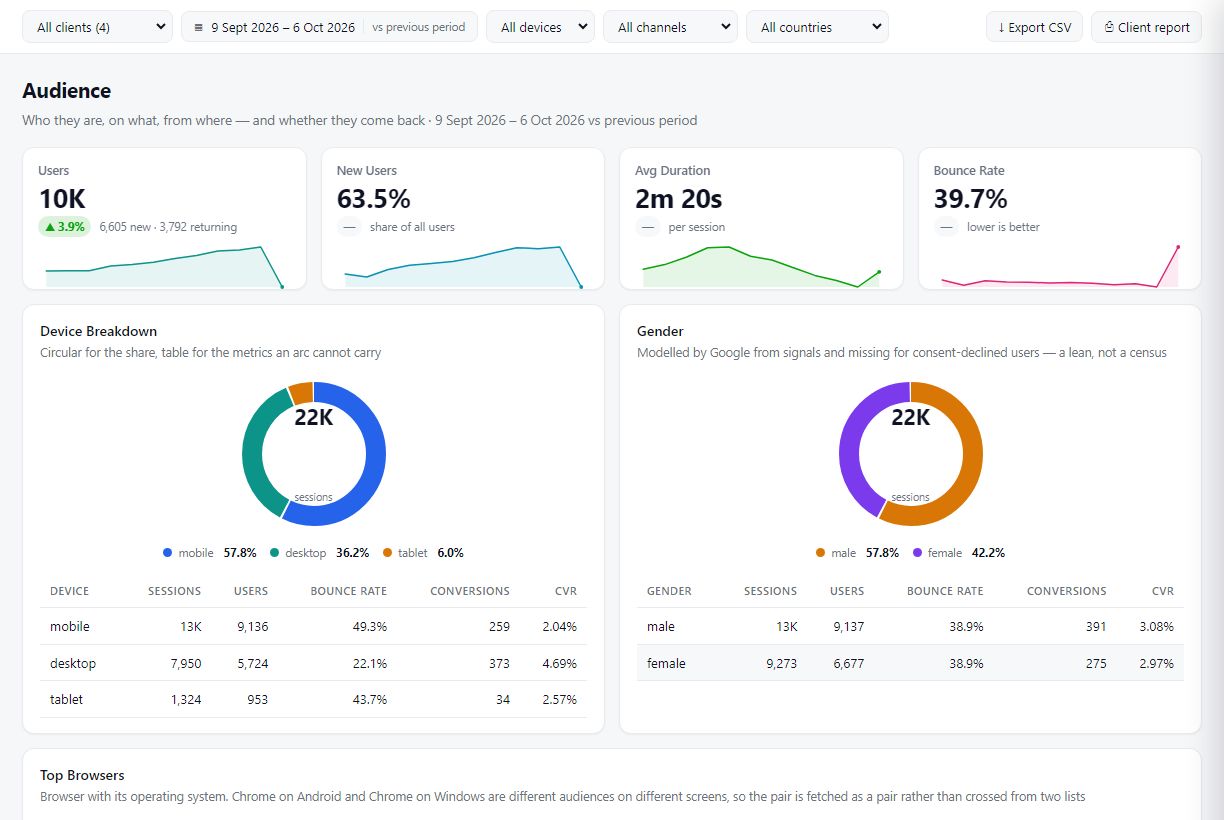
Understand who visits — and who gets in touch
Users, sessions, channels, devices, locations and key events from your GA4 property, explained in words as well as charts.
- Which channels bring visitors, and which bring enquiries
- New and returning visitors, devices and engagement
- Key events and conversions, measured — never estimated
Hand your client a report they can actually read
Put several websites in one account, invite your team, and share a white-labelled report through a private link — your client sees their own figures and nothing else.
- One dashboard for all the sites you manage
- Print-ready reports and a share link that needs no login
- Team access you can grant and remove at any time

From sign-up to your first report in a few minutes
Create your GreatInflux account
Sign up with your email address. No card required.
Connect Google Analytics 4 or Search Console
Click Connect. Google shows its own consent screen naming GreatInflux and the read-only access requested. Nothing is shared until you click Allow.
Choose your property and website
Pick the GA4 property and Search Console site you want in the report.
Read and share your report
See your traffic, rankings and enquiries in one place, and share it with your team or client.

Ask Claude or ChatGPT about your website
GreatInflux is also an MCP server. Add one link to your AI assistant and ask questions about your own Analytics and Search Console data in plain English — with the same read-only access as your dashboard.
https://audit.greatinflux.com/mcp- Open claude.ai (or the Claude desktop app) → Settings → Connectors.
- Click Add custom connector. Name it ONE Dashboard and paste the URL above.
- Click Connect, sign in to GreatInflux and click Allow.
- In a chat, open the + menu, switch on ONE Dashboard and ask away.
- In ChatGPT open Settings → Apps & Connectors → Advanced settings and turn on Developer mode.
- Back in Apps & Connectors, click Create. Name it ONE Dashboard, paste the URL above and choose OAuth.
- Sign in to GreatInflux and click Allow.
- In a new chat, pick ONE Dashboard from the tools menu and ask your question.
Custom connectors depend on your ChatGPT plan; the menu names can differ slightly between versions.
- Claude Code — run this, then type /mcp and choose Authenticate:
claude mcp add --transport http one-dashboard https://audit.greatinflux.com/mcp
- Cursor — Settings → MCP → Add new MCP server, then add:
{ "mcpServers": { "one-dashboard": { "url": "https://audit.greatinflux.com/mcp" } } } - Any other MCP client that supports remote servers with OAuth works the same way.
Three pages account for most of the drop. All three slipped in average position, and GA4 shows organic visits falling with them:
| Page | Clicks | Position | GA4 visits |
|---|---|---|---|
| /pricing | −412 | 4.1 → 7.8 | −18% |
| /blog/local-seo | −265 | 2.9 → 5.4 | −22% |
| /services/audit | −131 | 6.0 → 9.2 | −9% |
Agentic SEO, AEO & GEO, straight from your ONE Dashboard
Your AI assistant does the analyst’s work: it reads your own Search Console and Analytics data, finds what to fix, and drafts the fix. Access stays read-only — you review the changes and publish them yourself.
Rank higher on Google
Finds keywords sitting on page two, pages competing for the same query, ranking drops and slow pages — then writes new titles, meta descriptions and a fix list for each.
“Which keywords are one push from page one, and what should I change?”
Get quoted in answers
Turns the real questions people search for you into clear answers and FAQ schema, so Google’s answer boxes and AI Overviews have something to quote.
“Write FAQ answers and schema for the questions people find us with.”
Show up in AI assistants
Shows which AI assistants — ChatGPT, Perplexity, Gemini, Copilot, Claude — already send you visitors and where they land, and what to strengthen so more AI answers cite you.
“Which AI tools send us traffic, and how do we get cited more?”
How GreatInflux uses your Google data
We ask for the minimum access needed to show you your reports — and nothing more.
| Google access we request | What we read | Why we need it |
|---|---|---|
Google Analytics — view onlyanalytics.readonly |
Your GA4 property list and reports: users, sessions, channels, pages, devices, locations and key events. | To show your website traffic and conversions in your GreatInflux dashboard and in reports you choose to share. |
Search Console — view onlywebmasters.readonly |
Your verified sites, search performance (queries, pages, clicks, impressions, CTR, position), sitemaps and URL index status. | To show how your site performs in Google Search and which pages need attention. |
Basic profileopenid email profile |
Your Google account email address, name and profile picture. | To show which Google account is connected, so you can tell your connections apart. |
GreatInflux's use and transfer to any other app of information received from Google APIs will adhere to Google API Services User Data Policy, including the Limited Use requirements. Read the full Privacy Policy.

Built for people who need answers, not more tabs
Business owners
Know whether your website is bringing in customers — in plain English, without learning GA4.
Marketing agencies
Manage every client’s Analytics and Search Console from one login and send reports in minutes.
SEO specialists
Spot ranking changes, page-two opportunities and index problems as soon as Google reports them.
Frequently asked questions
Can GreatInflux change anything in my Google Analytics or Search Console?
No. We only request read-only access. We can view your reports but cannot edit settings, delete data or add users.
Which Google account data do you store?
We store an encrypted access token so the report can refresh without asking you to sign in again, and your Google email address so you can see which account is connected. Report figures are cached for a short time (normally 30 minutes, at most 12 hours) so pages load quickly. Details are in our Privacy Policy.
How do I disconnect?
Click Disconnect on the Connections page in your dashboard — we delete the stored access immediately. You can also remove GreatInflux at any time from your Google Account permissions.
Who can see my report?
Only you, team members you invite, and anyone you send a share link to. You can turn a share link off at any time.
Can I use GreatInflux inside Claude or ChatGPT?
Yes. Add https://audit.greatinflux.com/mcp as a custom connector (see Use it in your AI) and sign in to GreatInflux. Your assistant then reads the same read-only reports you see in your dashboard, only when you ask it to. Remove the connector, or disconnect it from your dashboard, at any time.
Do I need both Google Analytics and Search Console?
No. Connect either one, or both. Each is connected separately, so you only grant the access you want to use.
See your website clearly, starting today
Connect Google Analytics 4 and Search Console in a few clicks. Read-only, and you can disconnect at any time.